
Staff roster software Build next week's roster in minutes. Your staff see it on their phones.
WorkRoster replaces the spreadsheet, the paper copies and the group chat with one roster that is always up to date. Staff hear about changes straight away and get a reminder before every shift.
- 21 days free
- No card needed
- Staff use it free

- Online roster software since 2009
- Used by thousands of businesses
- Free iPhone and Android apps
- 30-day money-back guarantee
One roster, always up to date
Roster problems often start with someone looking at an out-of-date copy. WorkRoster keeps a single copy that everyone sees, so a change reaches the right people as soon as you make it.
- Without WorkRoster: The roster is a spreadsheet only you can edit, sent round as a photo.
- With WorkRoster: Build it once, set regular shifts to repeat, and everyone sees the same copy.
- Without WorkRoster: Staff message you to ask when they are working.
- With WorkRoster: Staff check their shifts in the app instead.
- Without WorkRoster: A late change means phoning round until someone picks up.
- With WorkRoster: Change the shift and the people affected are told at once. They can accept or decline it in the app.
- Without WorkRoster: Holiday requests arrive by text, email and notes on the fridge.
- With WorkRoster: Requests come in through WorkRoster, and you can see who is away before you plan.
What managers say about WorkRoster
It's now so easy to do the roster. One really horrible job now quite pleasant to do!

WorkRoster has revolutionised our workplace as shifts can be uploaded online for all to see, we have an app that works for everyone and is fast and fun.

We have found WorkRoster super easy to use, and it has improved our staff communication. The Availability function has made creating the roster a breeze.

WorkRoster was chosen due to its reputation and immediate ease of use when testing it. WorkRoster is now a key tool in managing of our most important service.


Who builds and supports WorkRoster
I started building online roster software in 2009, and WorkRoster is still made and supported by me and my team. When you get in touch, you talk to the people who build it, not a call centre.
My promise: we keep WorkRoster simple and reliable, so you can learn it in minutes and depend on it every day.
Jason Lee – Founder, WorkRoster.
What WorkRoster does
Plan shifts, give each staff member the free app, and spend less time on everyday admin.
Plan shifts quickly
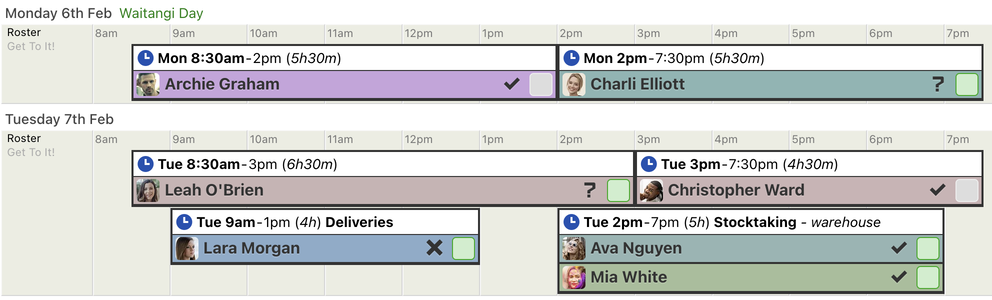
WorkRoster shows every shift on a calendar view in time order, with the staff assigned to it. Click to add a shift, pick who is working, and copy the days and weeks you want to reuse.
More about shift planning- Repeating shifts fill future weeks for you
- See availability and holidays before you assign anyone
- Unfilled shifts clearly visible on the roster view
Keep staff informed without chasing them
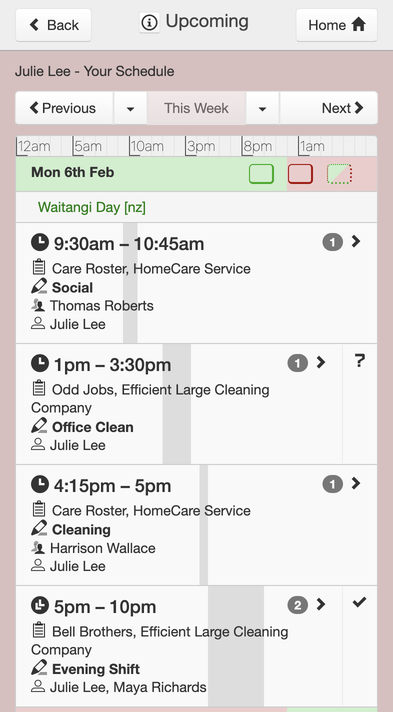
Staff use the free app or any web browser to see their shifts (and the wider roster if you allow it) and any changes. No more ‘Am I working Saturday?’ messages.
- Notifications when a shift changes, and a reminder before each one
- Accept or decline new shifts in the app
- Calendar feeds for Google, Apple and Outlook
Manage holidays, sick leave and staff messages alongside your roster
Holiday requests
Staff ask for time away in the app. Once you approve it, it shows on the roster.
Sick leave
Record absences as they happen, so gaps and cover are easy to see.
Memos and chat
Send updates to everyone, see who has read them, and chat with your team.
Printouts and exports
Print a clear PDF roster for the wall, or export hours to CSV for payroll.
Made for shift work
Care providers, cleaning firms, security companies, pubs, shops and leisure centres plan their rosters with WorkRoster.
Set up in three steps
Each step has a short video tutorial.
-
Set up your business
Add your business name and create your first roster.
-
Add your staff
Enter names and email addresses. Each person gets an invitation to the app.
-
Add shifts
Add shifts, assign staff and set the regular ones to repeat. Your staff see the roster straight away.
Priced by staff numbers
From $36 + tax a month for up to 10 employees
Every plan includes every feature, from the apps to reminders and printouts. Pick the plan that fits your staff numbers, and change it whenever you want.
- Only the account owner pays. Staff use WorkRoster free.
- Pay monthly or annually
- No contract. Change or cancel at any time.
- 30-day money-back guarantee
Frequently asked questions
What is WorkRoster?
WorkRoster is online staff roster software with free apps for iPhone and Android. Managers plan shifts, assign staff and approve holiday requests on the web. Staff see their own shifts on their phone and get a reminder before each one.
How much does WorkRoster cost?
Plans are priced by staff numbers, starting at $36 + tax a month for up to 10 employees. You can pay monthly or annually, change plan as your team grows, and cancel at any time.
Do my staff need to pay or install anything?
No. Employees use WorkRoster free, either in the iPhone or Android app or in any web browser. You decide what they can see.
How does the free trial work?
You get 21 days to try WorkRoster with your own staff and shifts, and no card is needed. Nothing is deleted when the trial ends: your rosters and staff stay saved, and your account becomes a limited free version until you choose a plan.
How long does it take to set up?
Most of the work is entering your staff and regular shifts once. Add your business, create a roster, add employees by name and email, then add shifts and set the regular ones to repeat. A short video tutorial covers each step.
Can I manage more than one site or team?
Yes. Create a separate roster for each site, department or team. Staff who work across several see all of their shifts in one place.
Is my data safe?
Your data is stored in a secure data centre in London and backed up every hour, and it is sent over encrypted connections. We follow GDPR and the other data protection rules that apply. Staff only see what your workforce permission settings allow. You can also keep your own copies with PDF printouts and nightly backups to your Google Drive.
Try WorkRoster with your own roster
Start your 21-day free trial. No card needed, and your staff use it free.